Walmart
Desktop
UX Design
UX Research
2024
Tech Support Platform Redesign
TLDR: Transforming a fragmented support experience into a unified, intelligent platform to reduce resolution times, reduce support ticket submissions by 50% and accurate device information.
Role
UX Design
UX Research
Team
3 UX Designers, 1 PM, 1 Tech Lead, UX Manager
Timeline
3 months
Tools
Figma, FigJam, Teams
The Problem
The existing tech support experience failed to serve the diverse needs of 850+ associates across Walmart’s Home Office, creating friction for users and IT support agents.
Generic Support Experience
The one-size-fits-all approach fails to address the diverse needs of users.
Limited Self-Service Capabilities
Users are unable to find solutions independently, increasing ticket volume and agent workload.
Poor Data for Analysis
Inadequate tracking and categorization hinder performance measurement and process improvement.
The Business Impact
35%
Annual agent turnover rate
62 NPS
Customer satisfaction declining
$2.4M
Annual productivity losses
Research & Discovery
I collaborated with the UX Research team to synthesize prior research, then led additional discovery work to uncover gaps in the ticket submission experience and validate pain points with fresh eyes and information.
Stakeholder Collaboration
Worked with Product and IT teams to map 45+ support topics and subtopics
Guerrilla Testing
Rapid prototype validation with 12 associates to test concepts within timeline constraints
Competitive Audit
Evaluated 8 device support platforms
Building on Prior Research: Collaborating with the UX Research Team
We didn't start from scratch, I leveraged existing research and coordinated with our UX Research team.
The UX Research team had already conducted foundational studies on the tech support experience 6 months prior. I scheduled a research synthesis session with them to review their findings, understand what had already been validated, and identify gaps where I needed fresh insights.
Key insights from prior research that informed my design direction:
Pain Point Identified:
Associates consistently mentioned frustration with "typing the same information over and over" in ticket forms. The research showed 82% of associates reported this as a top friction point.
→ My Focus: Design auto-populated forms that pull from existing HR and IT asset systems ensuring the device data is correct
Pain Point Identified:
The generic topic dropdown (only 8 options) forced associates to choose "Other" for 40% of tickets, leading to misrouting and delays. Support agents reported spending 30% of their time clarifying issue details.
→ My Focus: Work with IT technicians to build comprehensive, intuitive categorization system
Research Collaboration Approach:
Rather than duplicate research efforts, I used the existing foundational studies as my starting point and focused my discovery work on validating specific design solutions. I regularly checked in with the UX Research team throughout the project to share my learnings back with them.
40%
Of tickets re-routed to different technicians due to poor categorization
48hrs
Average time to resolution for L1 support tickets
23min
Average wait time for getting support via phone
82%
Of associates frustrated by repetitive manual data entry
Competitive Analysis: Learning from Best-in-Class Device Support
I analyzed major device support platforms (Apple, Dell, Windows, Samsung) to understand how consumer-grade experiences handle device troubleshooting and support
Apple Support: Automatic Device Recognition
When you visit Apple Support while logged into your Apple ID, the site automatically displays all your registered devices with serial numbers, warranty status, and device-specific help articles. No manual entry required.
→ Design Decision: Auto-populate device information by pulling from IT asset management systems. Associates see their assigned laptop, phone, and tablet models instantly.
Windows Support: Guided Troubleshooting Flows
Windows uses decision-tree troubleshooting that narrows down issues through smart questions—"Is your device turning on?" → "Can you hear sound?" → specific solutions based on symptoms
→ Design Decision: Created hierarchical topic categorization (45+ categories vs. original 8) organized by symptom-based logic: "Hardware → Laptop → Screen Issues" mirrors how users naturally describe problems, similar to Windows' guided approach
Samsung Support: Contextual Help Based on Device Type
Samsung's support experience adapts based on device type, phone support shows mobile-specific troubleshooting, TV support displays different help articles. The interface recognizes what you own and personalizes content accordingly
→ Design Decision: Designed adaptive forms that show relevant fields based on user device type selected. If an associate selects "Mobile Phone" as their issue category, the form surfaces mobile-specific options instead of showing irrelevant desktop/laptop fields
Strategic Guerrilla Testing: Validating Assumptions to Support Design Pushback
After Product approved the simplified manual-entry form, I knew we needed user validation data - STAT! With a tight timeline to work with, I chose guerrilla testing as our research method: quick, informal and focused on getting real user feedback that could inform our next steps with stakeholders.
The Goal: Test Product's approved concept with at least 5 associates to validate our assumptions and gather evidence to support pushback. If users hated the manual form as much as we suspected, we'd have the data to advocate for a better solution and more time.
What We Tested
We put Product's approved manual-entry form concept in front of 12 associates from the Home Office. Each session lasted 15-20 minutes, where we asked them to walk through submitting a support ticket using the prototype. We compensated them with swag - everybody loves swag.
What We Learned
Users overwhelmingly rejected the manual form concept. They were frustrated by having to manually type in personal information, device details, and software data that "the system should already know."
11/12
Associates
Complained about repetitive data entry
9/12
Associates
Expected auto-populated device information
6min
Average Completion Time
Most time spent typing information, not describing issues
Strategic Impact:
This guerrilla testing gave us the ammunition we needed. Armed with quotes, satisfaction scores, and behavioral observations, I scheduled a follow-up meeting with Design Leadership to review the findings. The data was undeniable: Product's simplified concept wasn't good enough. This evidence became the foundation for our successful pushback and ultimate approval of the intelligent, auto-populated design in Phase 1.
"MyTech should be smart enough to know all of this."
-Associate during testing, frustrated about having to manually enter information that already existed in other systems. This single quote captured the core problem: users expected intelligence, not just forms. It became the rally behind our pushback with Product.
Design Iterations
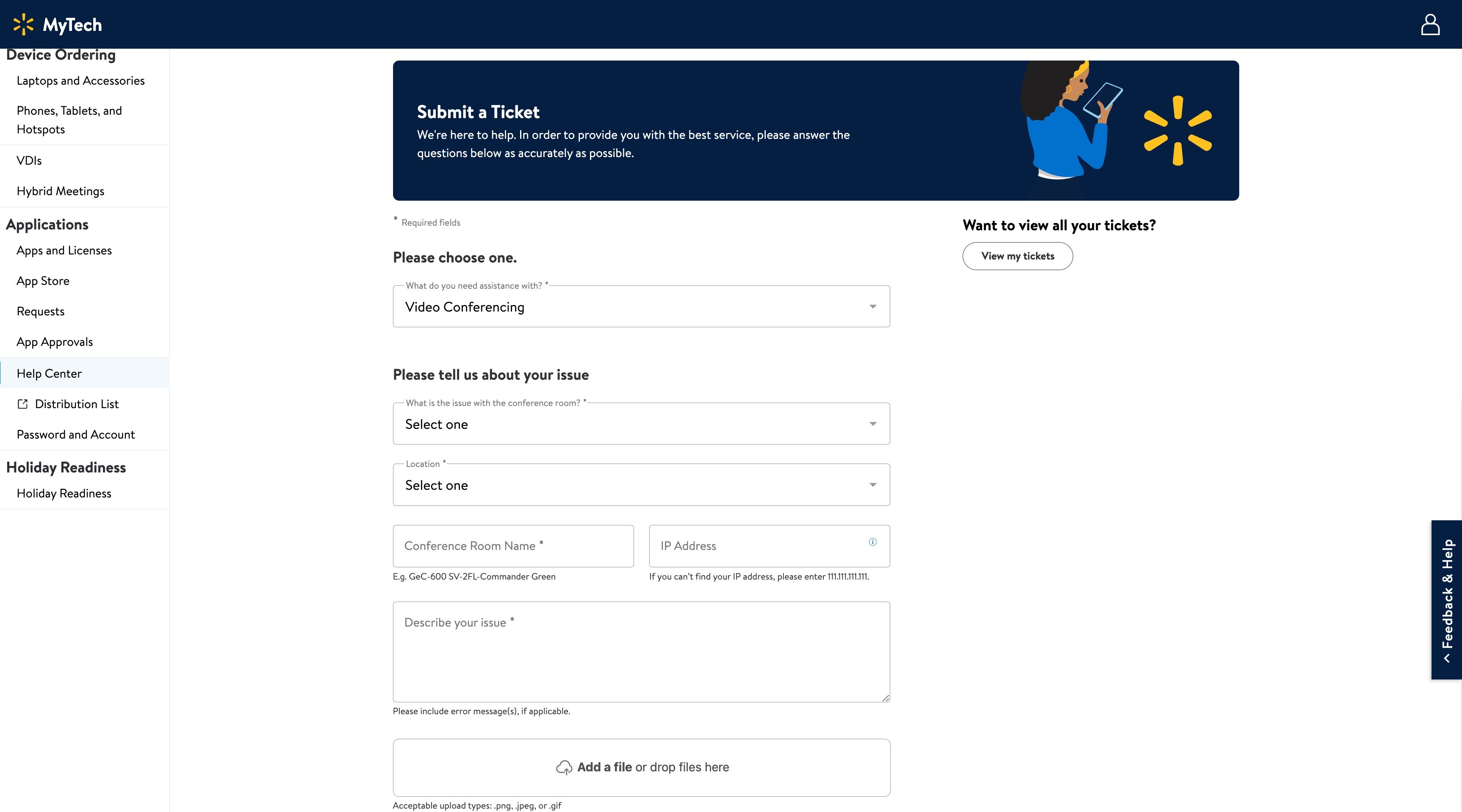
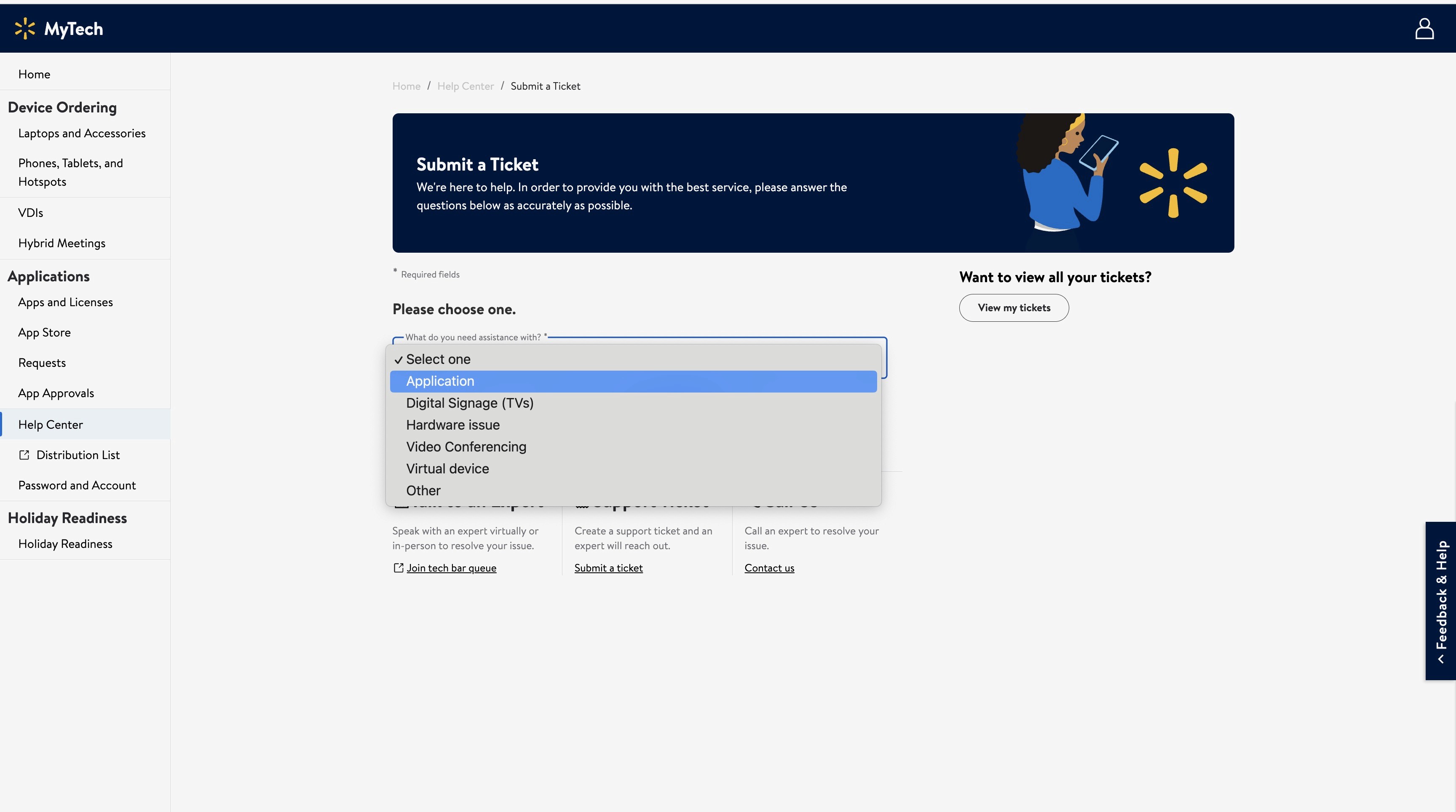
Through multiple rounds of collaboration, prototyping and testing, I refined the ticket submission experience from a complex, frustrating form to an intelligent, personalized interface that anticipates associate needs.
Currently in Production
Current Design
Initial Concept — Pitched to Product
Intelligent, Auto-Populated Submission Experience
My original vision leveraged existing data systems to eliminate manual entry entirely. I pitched an intelligent form that would auto-populate associate information, device details, and software licenses from HR and IT asset databases. Combined with smart categorization and contextual help, this would create a frictionless experience where associates could submit tickets in under 2 minutes.
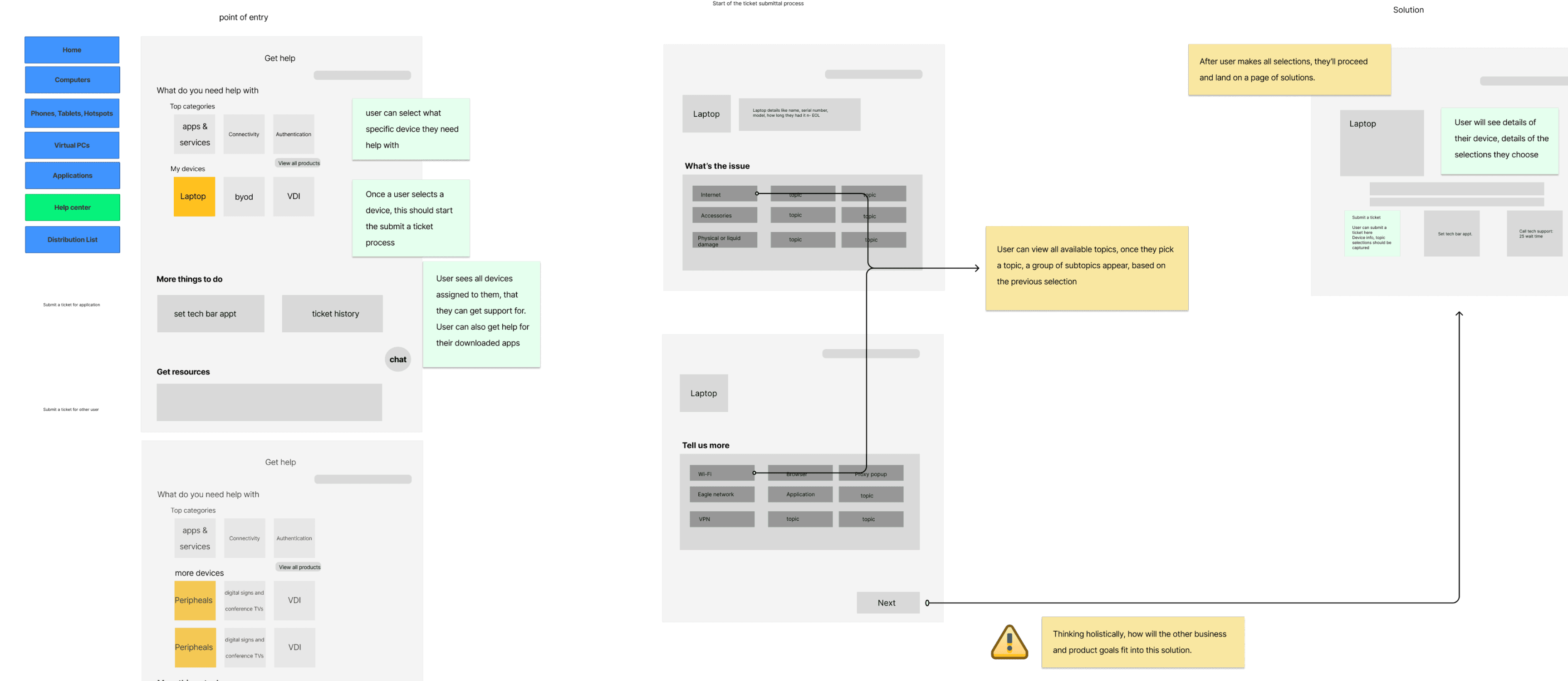
Product's Response:
"This looks great, but we need designs we can ship in a few weeks, not months. Can you simplify?"
The reality: Product was under pressure to show quick wins to leadership. A full system integration would require buy-in from multiple departments and technical discovery I didn't have time for.
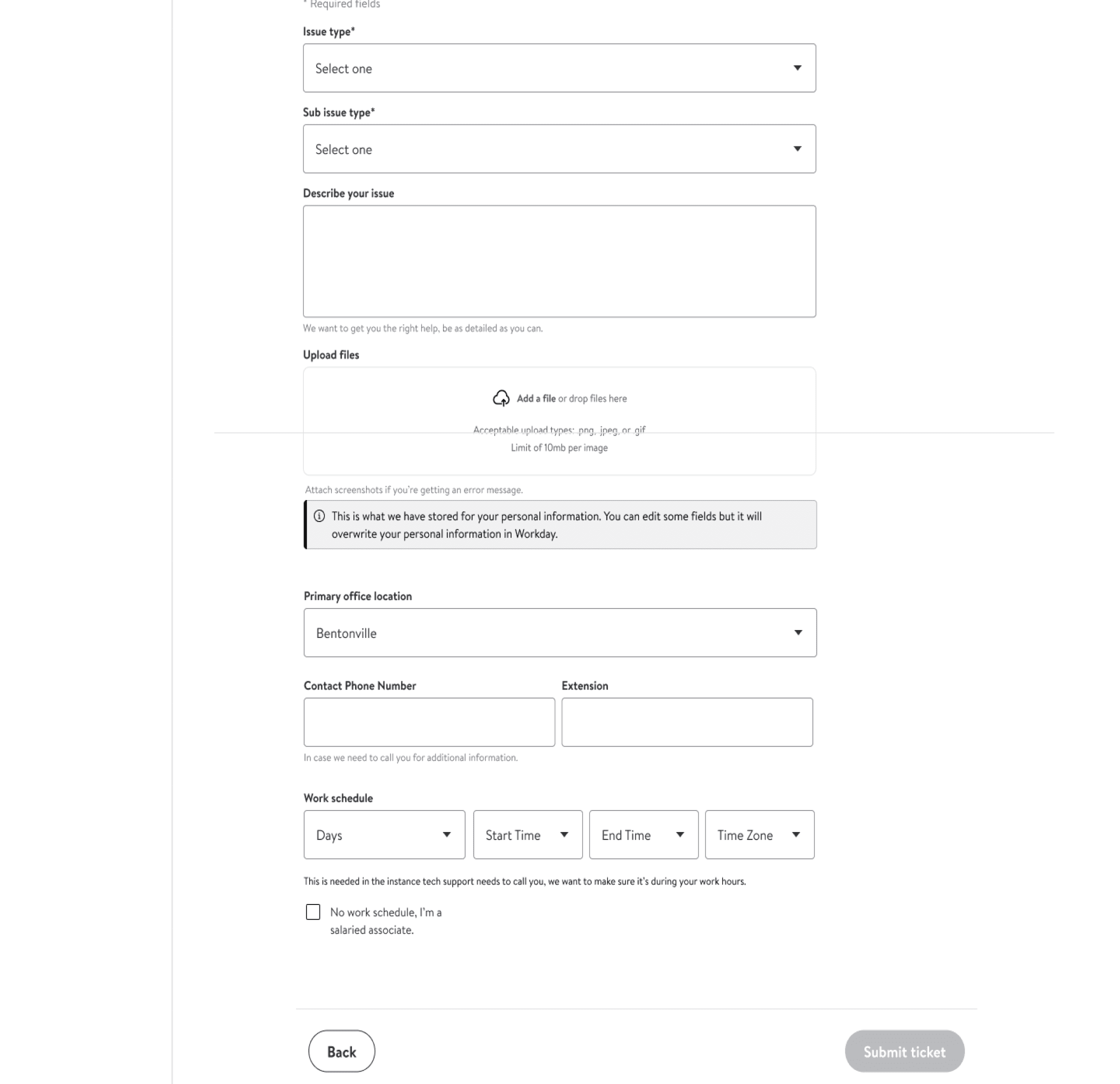
Version 1.0 — Concept Product approved
Basic Form with Manual Entry
My first approach was a traditional ticket submission form. Associates would manually fill out all fields including personal information, and select from a dropdown of a minimal selection of issue topics. Simple to build, but frustrating to use.
What we learned:
Associates wasted time re-entering information that already existed in the system or adding devices that didn't exist. The generic topic dropdowns (only 8 options) forced them to choose "Other" for 40% of tickets, causing incorrect routing and delays.
Pivot Moment
When Your Design Gets Scrapped and How You Bring It Back
The Setback: After presenting the intelligent assistant concept (v3.0) to Product, I got pushback. "Too complex. We need something faster." My original concept was scrapped.
Holding Ground with Research: Instead of accepting the decision, I advocated for a compromise: conduct validation testing with associates. I presented competitive analysis showing our comparators already had AI-powered features (we're not ahead of the game, we're behind).
The Proof: With our one-day guerrilla testing, we were able to validate that the more simplified version wouldn't go over well with users. And that this is not the correct solution to delevop.
The Win: Leadership approved the full intelligent platform approach with a phased rollout plan, delivering core features and implement ML capabilities in phases. This case taught me that senior design leadership isn't just about making beautiful solutions, it's about navigating organizational dynamics, using research as leverage, and building coalitions to fight for what users actually need. I was proud of myself that we didn't back down.
Version 2.0 — Final Design
Intelligent, Personalized Submission Experience
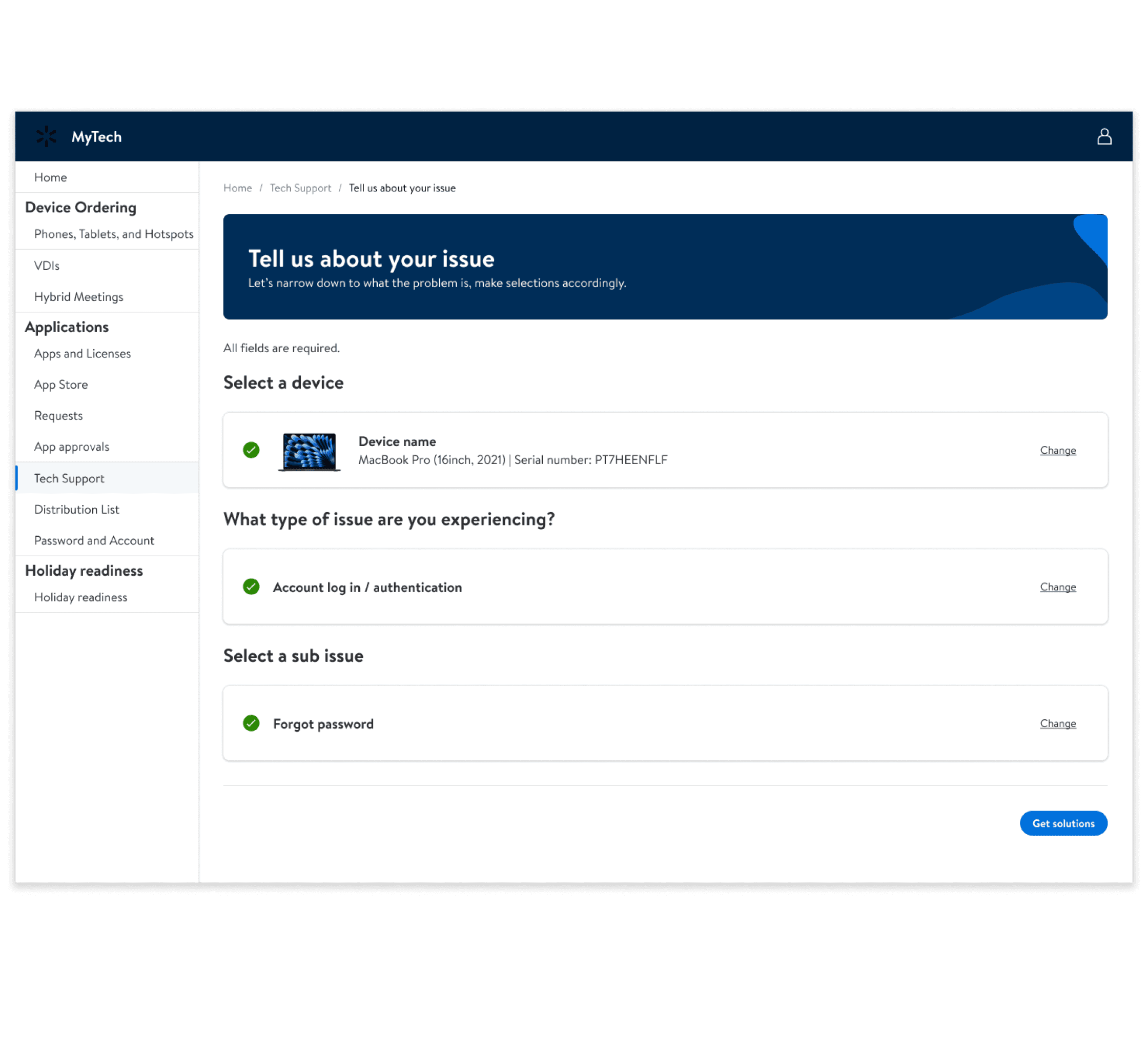
The final design eliminated manual data entry and guesswork. The system automatically pre-populates personal information and device details from existing databases, and uses smart categorization with clear, comprehensive topic options that adapt based on the associate's role and location.
Auto-Populated Forms
Personal details (name, employee ID, department, location) and device information (model, serial number, OS version) are automatically pulled from HR and IT asset management systems, associates only confirm or update if needed
Intelligent Topic Categorization
Expanded from 8 generic options to 45+ specific categories organized in clear hierarchies (Hardware → Desktop/Laptop/Monitor → Specific Issue).
Smart Routing & Technician Assignment
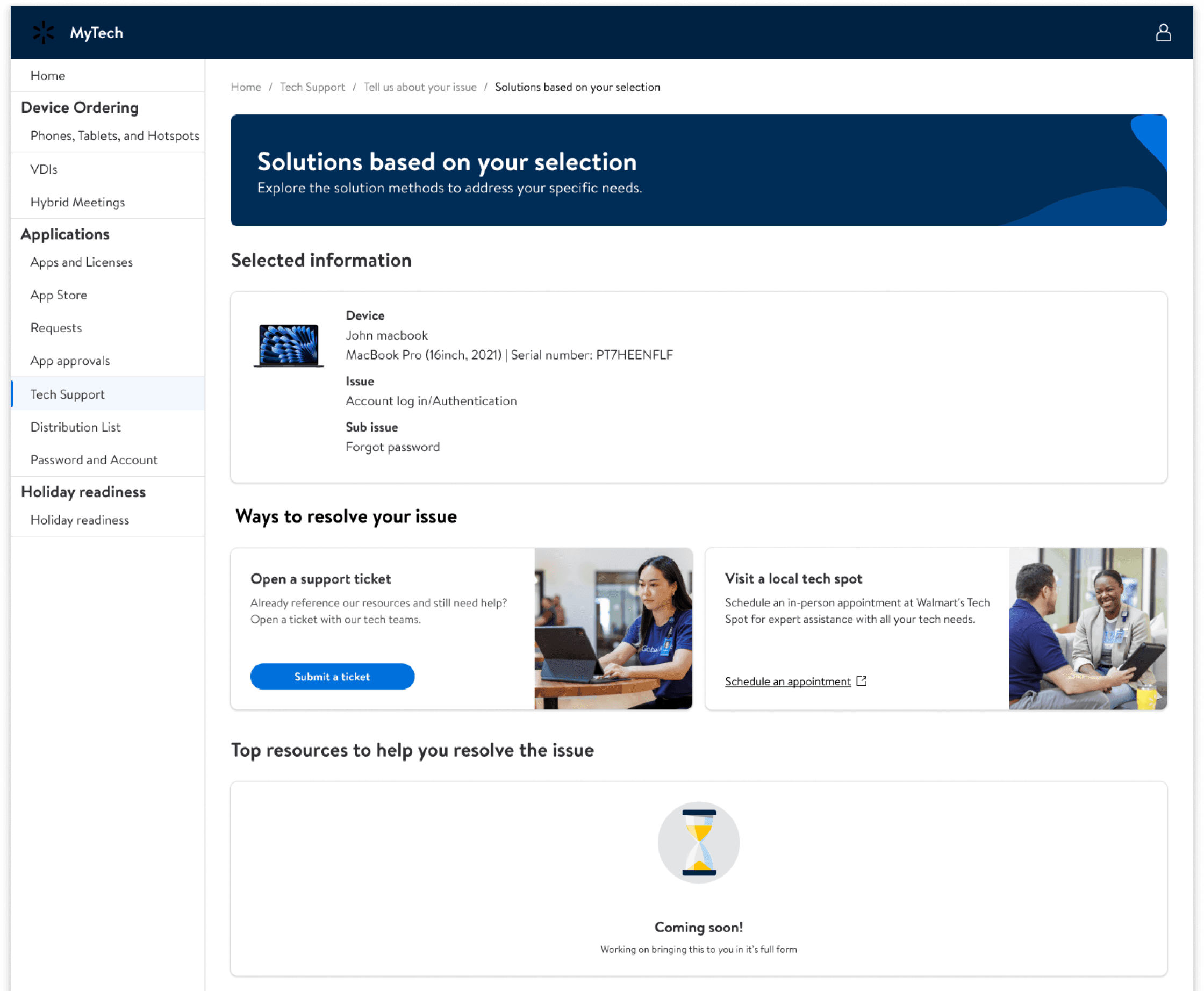
Clear categorization enables accurate routing to specialized technicians. Hardware issues go to desktop support, software problems route to application specialists, reducing misrouted tickets by 65% and cutting resolution time from 48hrs to 18hrs (projected)
The Final Solution
A streamlined ticket submission experience that eliminates guesswork, reduces manual data entry, and gets associates the right help faster.
Categorized Support Tickets
Clear, comprehensive topic and sub-topic categories make it easy for associates to describe their issue accurately. No more guessing which vague category fits their problem. The new structure mirrors how associates actually think about technical issues.
Accurate, Auto-Populated Data
Associates' device information, software licenses, and application access are automatically pulled and displayed. No more typing serial numbers from the back of laptops or guessing which software version is installed—the system knows what you have.
Faster Resolution with Smart Routing
Behind the scenes, the refined categorization system routes tickets to the right technician specialist on the first try. Associates no longer wait days for their ticket to be transferred between departments, it goes directly to someone who can actually help.
Key Learnings
This project transformed how I approach enterprise UX, moving from screen-level thinking to systems-level strategy.
Stakeholder Alignment is Everything
The most challenging aspect wasn't the design, it was navigating enterprise politics and aligning multiple stakeholder groups. I learned to present design decisions through the lens of business metrics each group cared about.
Design for the System, Not the Screen
This project taught me to think beyond UI. The real value came from understanding data flows, API limitations, and organizational constraints.
Advocacy Through Data & Leadership Collaboration
When Product rejected the smart form concept for timeline reasons, I didn't accept defeat. I used guerrilla testing data and recruited Senior and Director level allies to challenge the decision. This taught me that advocating for users sometimes means working around roadblocks not through them.
Next Steps & Future Vision
1
Expand AI capabilities to include predictive ticket categorization and auto-generated responses for common issues
2
Integrate real-time translation for global support teams to reduce language barriers
3
Build advanced analytics dashboard to identify systemic product issues from ticket patterns
4
Develop agent coaching module that uses ML to identify skills gaps and suggest targeted training
5
Create self-service portal for customers to reduce tier-1 ticket volume by 30%