Walmart
Desktop
UX Design
UX Research
2024
License Onboarding for MyTech
TLDR: Designed an internal onboarding form at Walmart, reducing manual data entry by 75% and improving task completion rates for 8 product owners
Role
Lead UX Designer & Research
Timeline
8 weeks
Tools
Figma and FigJam
Final Design (Prototype)
A streamlined onboarding experience that guides users through the license setup process.
The redesigned onboarding flow simplifies license provisioning with clear steps and contextual information
The Problem
The original onboarding process had a 89% drop-off rate, with users abandoning the form before completing their license provesioning.
28%
Completion Rate
15
fields to manually complete
~45 min
Form completion time
Research & Discovery
I conducted comprehensive research to understand user pain points and uncover opportunities for improvement.
User Interviews
8 participants shared their onboarding experiences
Competitive Analysis
Analyzed 8 similar apps to identify best practices
A/B Testing
Validated design decisions with real user behavior

Discovery Moment: Connecting User Needs to Technical Constraints
Senior-Level Problem Solving
During user interviews, multiple participants expressed security concerns about the onboarding process, they didn't know if anyone could just come into MyTech and onboard a license that hasn't been approved across necessary security channels.
Rather than treating this as a simple communication problem, I recognized it as a technical constraint worth investigating. I hunted down the actual APIs powering the information needed for the onboarding flow and discovered they had information that could be used to eliminate manual entries throughout the form.
This insight shifted the entire design approach. Instead of just adding reassuring legal-jargon copy, I designed the onboarding form to where if the product license a user is trying to onboard is not approved, users are notified and re-directed to the starting point.
Additional Research Insights
Users felt overwhelmed by the number of questions and found it difficult to understand why certain information was needed.
The lack of progress indication made users unsure how much longer the process would take.
Users wanted the ability to skip optional sections and complete them later without losing progress.
Security was a concern for most users. - When I dug deeper, it gave me the information needed to hunt down the API’s needed for this project
100%
No Process Visibility
All 8 participants reported having zero visibility into their onboarding status after submission
75%
Prefer Infinite Scroll
A/B testing revealed 6 out of 8 users preferred infinite scroll over traditional pagination
3-5 days
Average Wait Time
Users waited days without updates, causing frustration and frequent support inquiries
Product Owner Journey Map
Mapping the complete journey from awareness to implementation, identifying key pain points and opportunities for improvement at each phase.
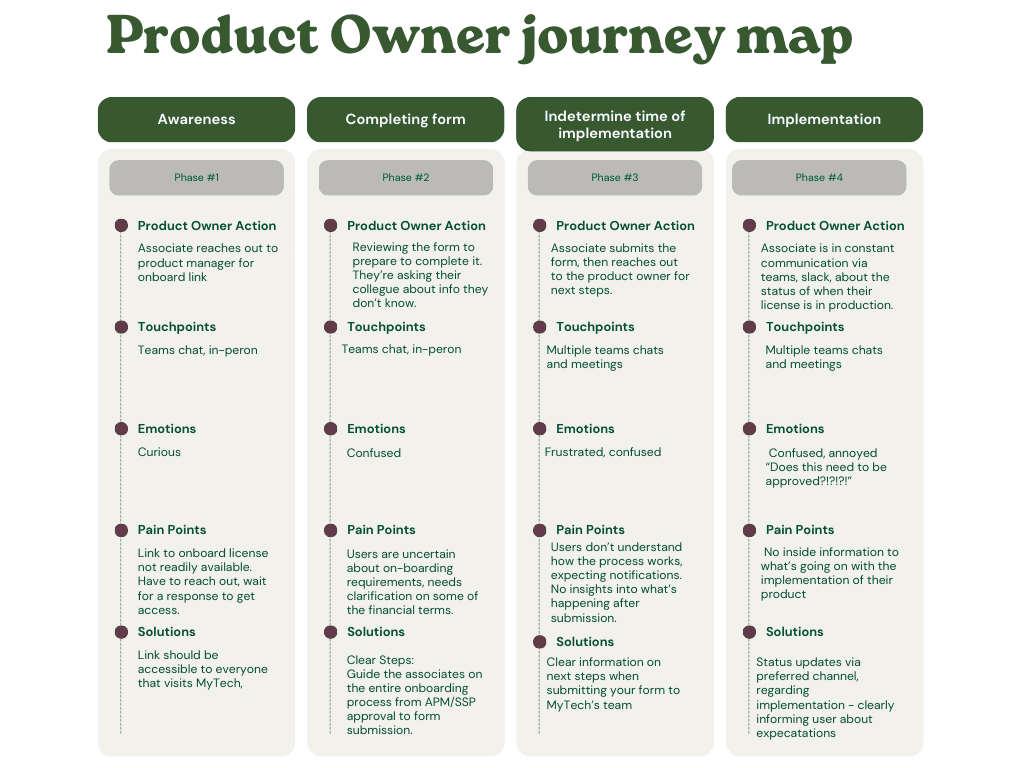
Awareness
Users need clear, accessible onboarding links
Completing Form
Confusion about requirements and financial terms
Waiting Period
Frustration from lack of updates and visibility
Implementation
Need for clear status communication
A/B Testing
Design Process
An iterative approach to solving the onboarding challenge
01
Information Architecture
Reorganized the onboarding flow to prioritize essential information and group related questions.
02
Wireframing
Created low-fidelity wireframes to test different layout options and interaction patterns.
03
Prototyping
Built interactive prototypes to validate design decisions with real users.
04
A/B Testing
Because of timeline, I conducted A/B testing to determine which interaction pattern users preferred.
Early Wireframes
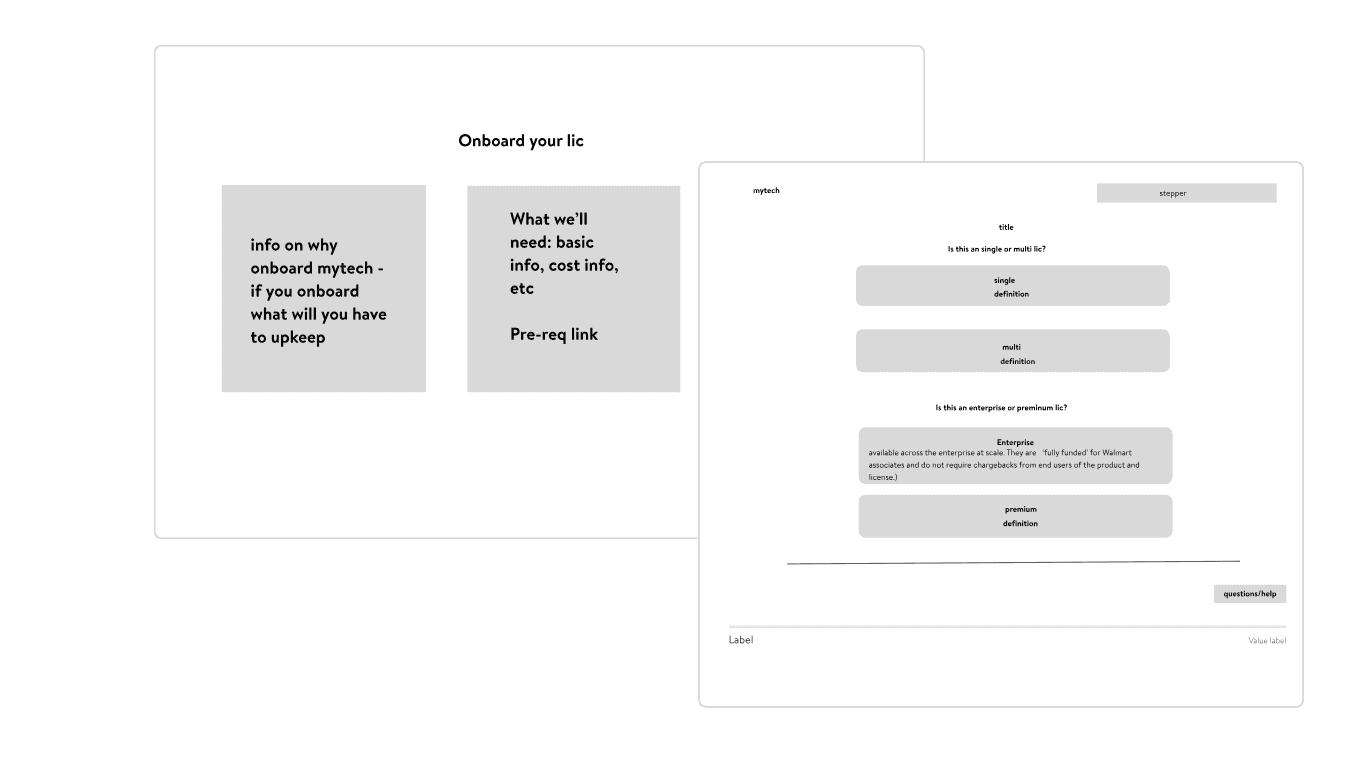
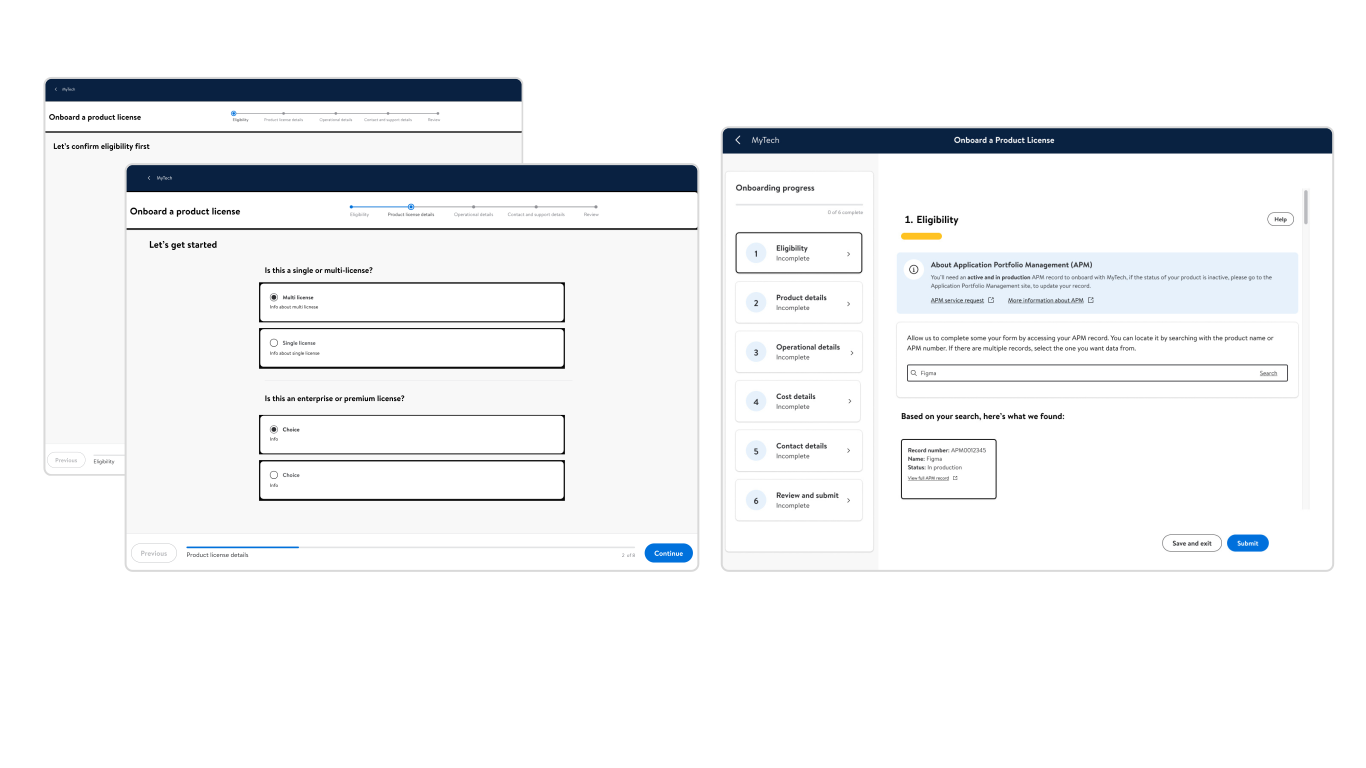
Version A
Version B
The Solution
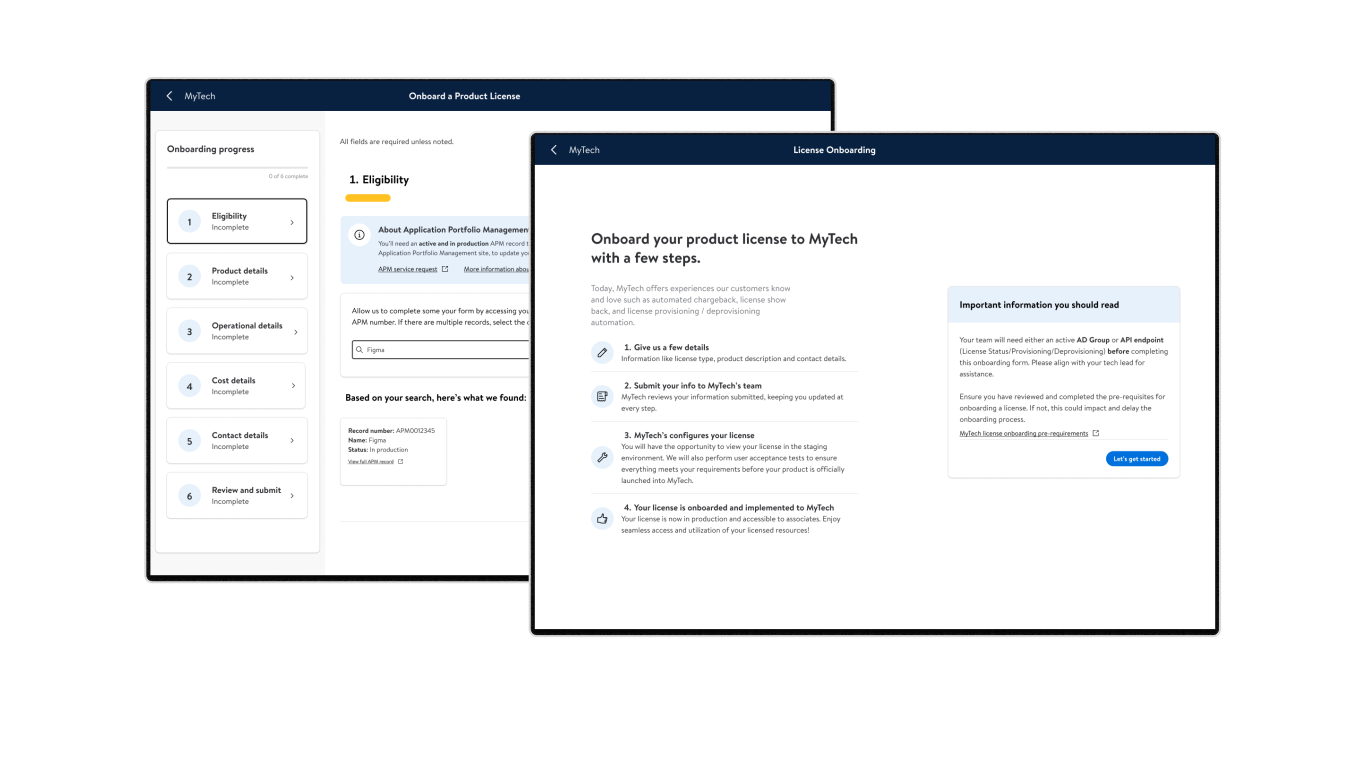
A streamlined onboarding experience that respects user time while gathering essential information
Automatic Data Entry
Reduced manual entry utilizing API's to pre-fill majority of fields
Clear Progress Indicators
Added visual progress bar and step indicators to show users exactly where they are
Contextual Help
Included tooltips and explanations to help users understand why information is needed
Key Design Decisions
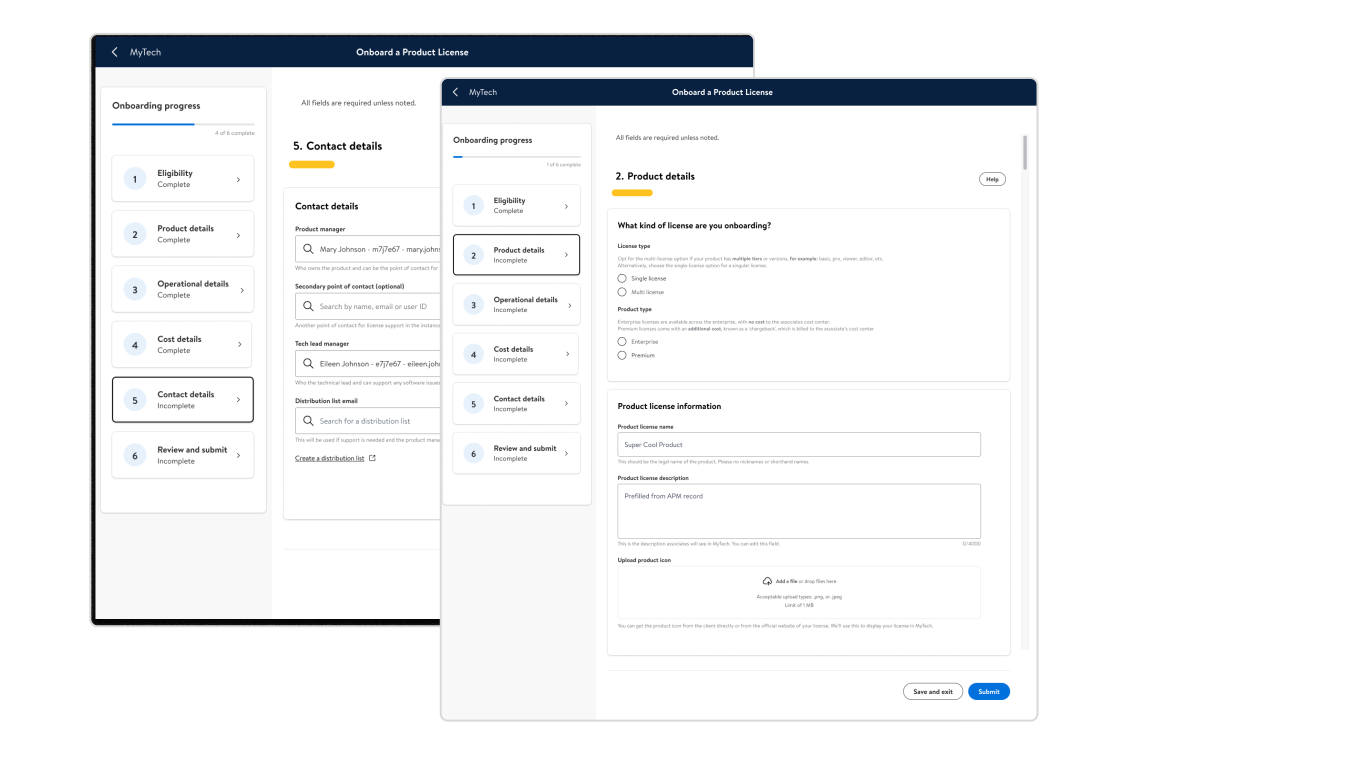
Reduced Cognitive Load
By breaking the onboarding into smaller, logical steps, users could focus on one thing at a time without feeling overwhelmed.
Transparency
Providing users with upfront information about the onboarding process, the what, why and what happens after submission.
Smart Defaults with API's
Pre-filled information helped users move through the flow faster with fewer decisions.
Contextual Help
Rather than offloading support to documentation or a help desk, bringing guidance into the form itself with tooltips and help documentation imbedded.
Key Learnings
Showing only what users need to know at each step reduces cognitive load dramatically
Always test with real users early and often assumptions about user behavior are often wrong
I now scope API feasibility early in discovery, specifically asking: what approvals are required and what's the contingency if they become a blocker?
Context is queen, explaining why you need information increases user trust and compliance
Next Steps
Conduct ongoing usability testing with product owners to validate design decisions and identify areas for iteration
Leverage AI to provide intelligent help suggestions and answer user questions in real-time during onboarding
Use machine learning to predict potential form errors and guide users proactively
Create automated follow-up communications using AI to keep users informed during the waiting period
Next Project

UX Design
Tech Support
Redesigning a responsive web application for streamlining support ticket submissions and reducing ticket submission by 50%.
View Case Study