American Airlines
Product Design
2025
Aircraft Parts Search System
TLDR: Built a parts search system from scratch within a legacy design system. Navigated union constraints and limited user access to prevent critical inventory losses.

My Role
Lead UX Designer
Timeline
4 months
Tools
Figma
The Challenge
Million-dollar aircraft parts were getting lost in the warehouse because technicians had no way to search for and locate inventory
The Situation
Our airline maintenance warehouses manage over 100,000 SKUs across multiple facilities, parts like tiny fasteners to turbine blades worth up to $1 million each. But there was a serious problem: no searchable inventory system existed.
Maintenance Line Technicians relied on physical location memory, legacy knowledge, and handwritten logs to find parts. When a technician who "knew where things were" retired or transferred, that knowledge vanished. Parts sat on shelves gathering dust while the company purchased duplicates, not knowing they already owned what they needed.
The Financial Impact
Why this wasn't just an inconvenience, it was a million-dollar problem
$6.5M
Annual duplicate purchases
Parts bought that already existed in the warehouse but couldn't be located
$8.7M
Aircraft downtime costs
Revenue lost while planes sat grounded waiting for parts technicians couldn't find
The Design Problem
I was tasked with designing a search system from the ground up that would allow warehouse technicians to quickly locate parts using multiple search criteria. But there were dual constraints:
Understanding user needs without user access
Which part identification numbers mattered? What search combinations did technicians use? What was their mental model for finding parts?
Building on prior project learnings
A pivotal prior project had created a part location tracking system that recorded where parts were stored. I needed to understand how that system worked and how technicians would used it, then layer search functionality on top.
Providing audit trail & accountability
Parts worth millions couldn't just "disappear" we needed tracking of where parts moved throughout the warehouse
Working within a legacy design system
The system had to fit within an outdated design system with limited components. I couldn't design the UI I had in mind.
The Union Constraint
Why traditional user research wasn't an option
Warehouse technicians were part of a unionized workforce with strict labor agreements. Any time spent on "non-work activities" including user interviews, usability testing, or observational studies required union approval, advance notice, and often compensation adjustments.
The process to get approval could take 4-6 weeks, and our project timeline was only 4 months. I had to design a search system without direct access to the users who would use it.
Working Around Constraints
Without direct user access, I had to get creative with research. I built strategic partnerships across the organization to get insights that I needed.
Mining System Logs & Warehouse Shadowing
Understanding user behavior through data patterns and observing MLS workflows in the warehouse
Cross-functional collaboration: I worked closely with the Product Manager, Tech Lead, and Business Analyst to interpret the data. They helped me understand what the patterns meant, translating raw logs into user needs and technical constraints.
What I Analyzed
•
Purchase order records showing which part identification numbers were used in procurement requests
•
Maintenance logs revealing which numbering systems were referenced most frequently
•
Handwritten warehouse logs showing the series of numbers MLS manually tracked for locating parts
•
Warehouse visit: Shadowed MLS technicians to observe their current search process, watching how they cross-referenced multiple paper logs and navigated the physical warehouse
What I Learned
Multiple ID numbers: Technicians combined 3-4 different identification numbers part numbers.
Manual cross-referencing: MLS spent significant time flipping between paper logs to match parts to locations, they needed consolidated digital search
Movement tracking: Handwritten logs showed technicians manually noted when parts moved between locations, they needed digital audit trails
Recruiting Subject Matter Experts as Proxies
Partnering with stakeholders who understood the work and could validate design decisions
While I couldn't test with warehouse technicians directly, I held weekly design sessions with the Product Manager and Business Stakeholder who had deep knowledge of warehouse operations and access to technician feedback from their regular check-ins.
Weekly Design Sessions
PM and Business Stakeholder walked me through search scenarios, pain points, and workarounds they'd documented from warehouse operations meetings
Mockup Validations During Big Room Planning
I presented design mockups during quarterly big room planning sessions where warehouse leadership could review and provide feedback on feasibility and confirm use cases
Uncovering Edge Cases
They surfaced rare-but-critical scenarios that helped me design for exceptions, not just happy paths
Validation Through Pilot Programs
Since I couldn't test before launch, I designed a low-risk rollout strategy to gather immediate feedback in production
Working with the Product Manager, we rolled out the system to approximately 10 appointed technicians as a pilot program. This wasn't formal user testing, it was a staged rollout—but it allowed me to gather immediate feedback and observe real usage patterns without violating union agreements.
Immediate feedback loop: By working closely with the pilot group, I was able to identify usability issues and what users anticipated most from the tool.
The feedback revealed that technicians bypassed the tooltip for one of the fields and expected to select what document type, before putting in a document number. I noted that and shared with the Product Manager.
What Worked
Multi-number search fields and the audit trail side panel were immediately adopted. Technicians appreciated being able to track part movements digitally.
What Needed Refinement
Technicians wanted a "recent searches" feature to avoid re-typing the same part numbers during multi-day repairs.
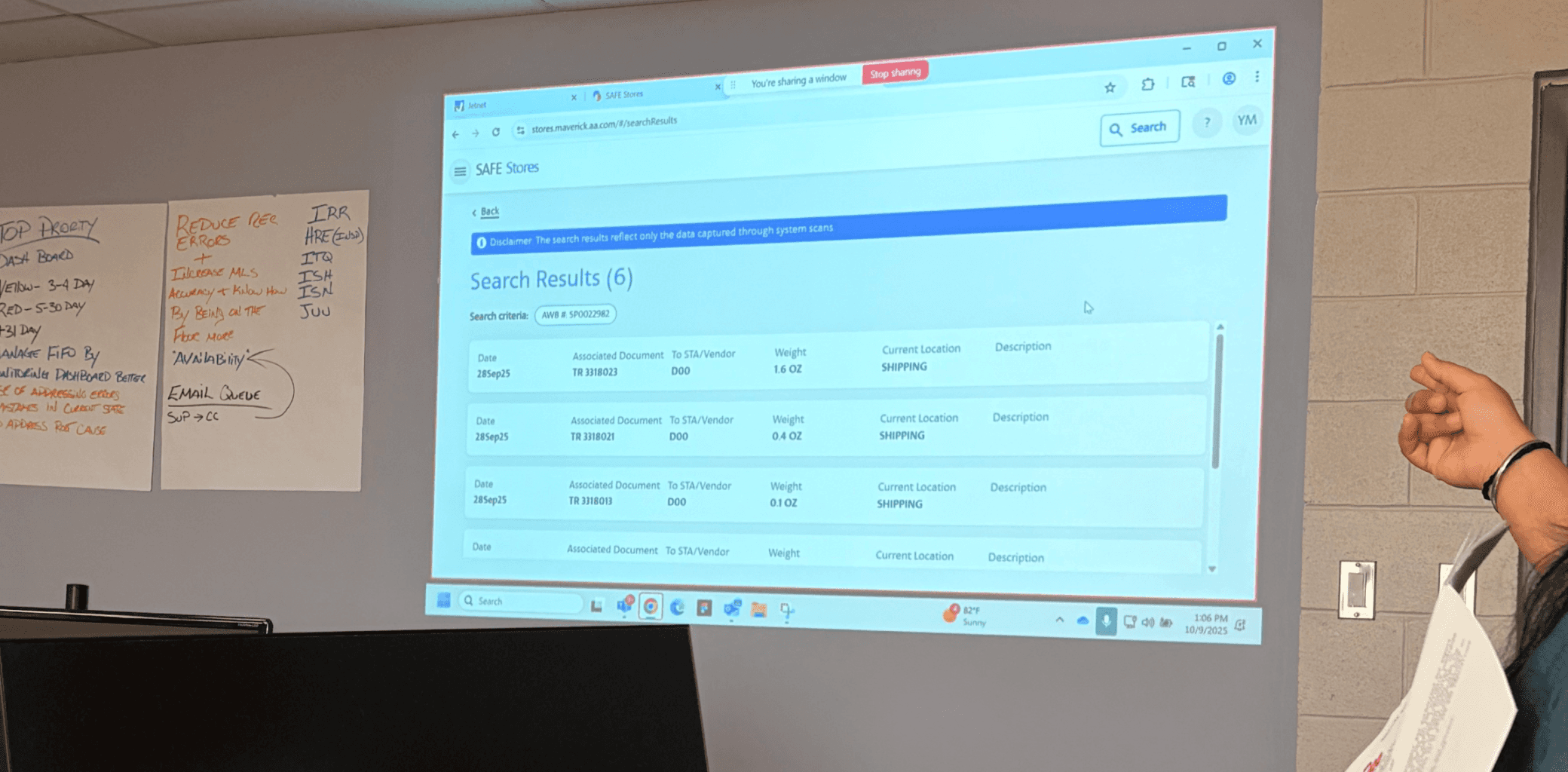
Pilot Feedback Sessions: Gathering insights from appointed technicians during the rollout phase

Gathering Feedback: I had to get creative. I asked a series of questions that could be quantified, gave them sticky notes and collected ratings.
The Solution
A multi-criteria search system built within legacy design constraints, designed around how technicians use identification numbers to locate parts
Multi-Number Search Fields
Technicians could search using any combination of part identification numbers: manufacturer part number, serial number, tracking tag, document number and much more. The system accepted any combination of search criteria selections
Based on data analysis: Logs showed technicians combined 3-4 different ID numbers to find parts, the search needed to support all numbering systems simultaneously
Movement History Side Panel (Audit Trail)
When a technician selected a part, a side panel revealed its complete movement history throughout the warehouse. Every location transfer, date/time stamp, and which technician moved it. This created accountability for million-dollar parts.
Based on handwritten logs: Technicians manually tracked part movements on paper, digitizing this as an automated audit trail eliminated manual logging while improving traceability
Designing Within Legacy Constraints
The search interface had to be built using an outdated design system with limited components from the early 2010s. I couldn't create custom UI elements or use the updated design system, I had to work with what existed.
The Constraint
Limited to basic form inputs, standard dropdowns, and simple tables, no autocomplete, no dynamic filtering, no modern interaction patterns
The Workaround
Prioritized clarity and predictability over sophistication. Made key fields larger for gloved hands, increased font size due to user group.
Final Screens

Multi-Number Search Interface
Search screen enabling users to locate parts across multiple identifiers

Search Results with Description Confirmation
Results table displaying part description, current location, priority and identifying part numbers
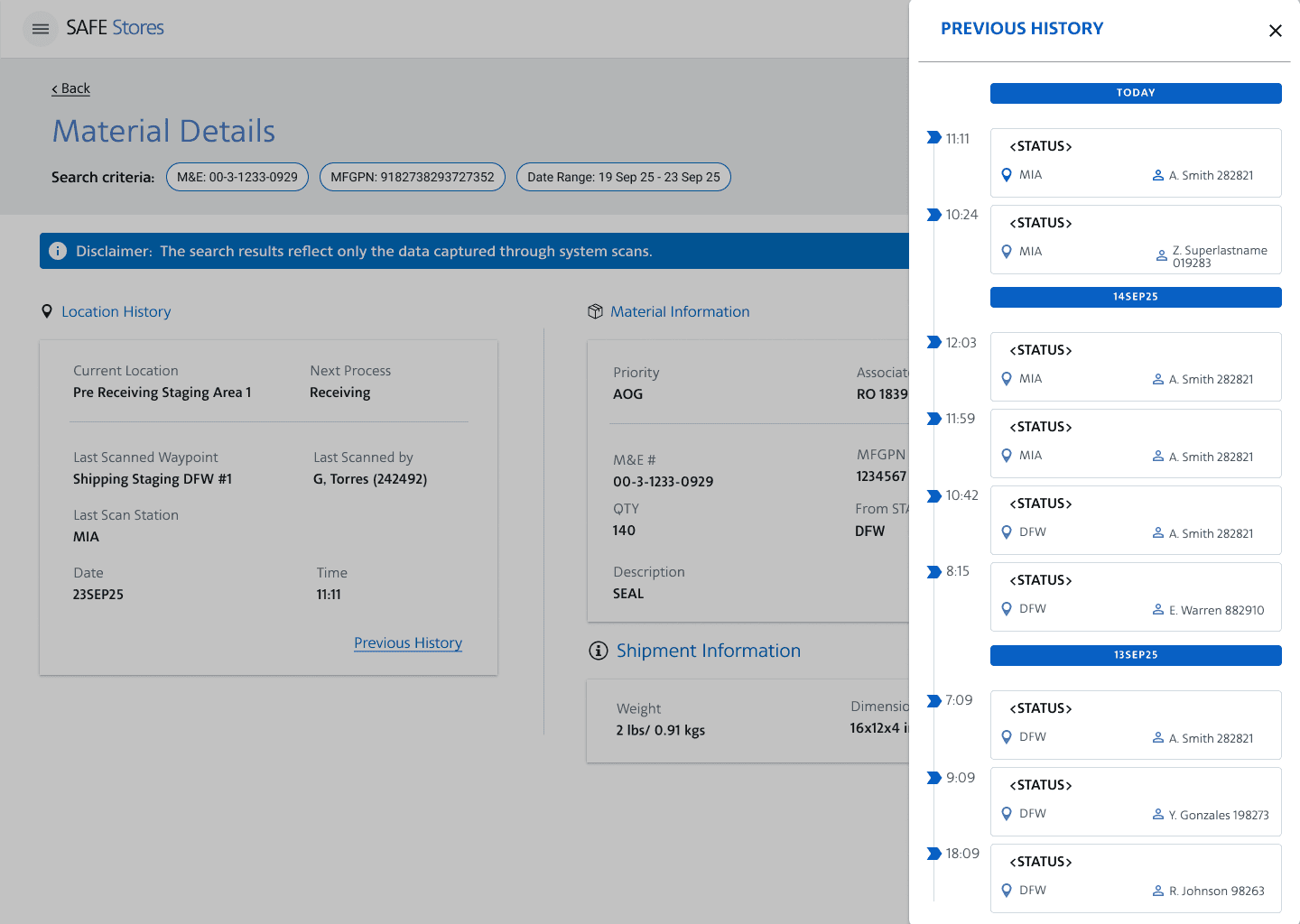
Movement History Audit Trail
Side panel revealing complete movement history: every location transfer, timestamp, and technician who moved the part
Key Learnings
This project redefined how I approach user research in constrained environments, validating that collaboration and creative problem-solving can substitute for traditional methods
Constraints Spark Creative Research Methods
Not having direct user access forced me to become resourceful. I learned that user insights exist in many forms purchase orders, handwritten notes and cross-functional partnerships.
Strategic Partnerships Are Essential
This project taught me that design doesn't happen in isolation. Building trust with Product, Tech, and Business partners gave me access to user insights I couldn't get on my own. The PM became my advocate, the Tech Lead was my data expert, and the Analyst was my validator.
Design Constraints Don't Mean Design Compromise
Working within a legacy design system with limited components forced simplicity. I couldn't rely on fancy interactions, so I focused on clarity, hierarchy, and usability fundamentals.
Final Reflection
This project challenged the assumption that "good UX requires direct user access." Now I strongly believe in user-centered design, but this experience taught me that when traditional research methods aren't available, strategic collaboration and proxy data sources can still lead to effective outcomes.
The key was transparency, I didn't pretend I had done extensive user testing. Instead, I documented my research constraints and clearly communicated the evidence behind each design decision to stakeholders. This honesty built trust and set realistic expectations for the pilot launch.